Google Search AI Mode: What It Is & How It Works
Search is changing faster than it has in years. Instead of typing a few words and scanning a page of blue links, you can now hold a back-and-forth conversation with Google itself. That shift has a name: Google Search AI Mode. This guide explains what Google Search AI Mode is, how it works, how to turn it on, and what it means for everyday users and website owners in 2026.
What Is Google Search AI Mode?
Google Search AI Mode is a conversational search experience built into Google Search and powered by Google’s Gemini models. It lets you ask long, detailed questions and get one AI-written answer with links to sources, instead of a plain list of results.
Google first tested the feature in Search Labs in early 2025, then rolled it out to everyone in the United States at Google I/O in May 2025 — no sign-up required. It has expanded quickly since. At its 2026 developer conference, Google said AI Mode had passed one billion monthly users and was available in close to 200 countries and around 98 languages, free of charge. France, the last major market to get it, gained access in July 2026.
In short, what began as a small US-only test is now one of the most widely used search tools in the world.
How Does Google Search AI Mode Work?
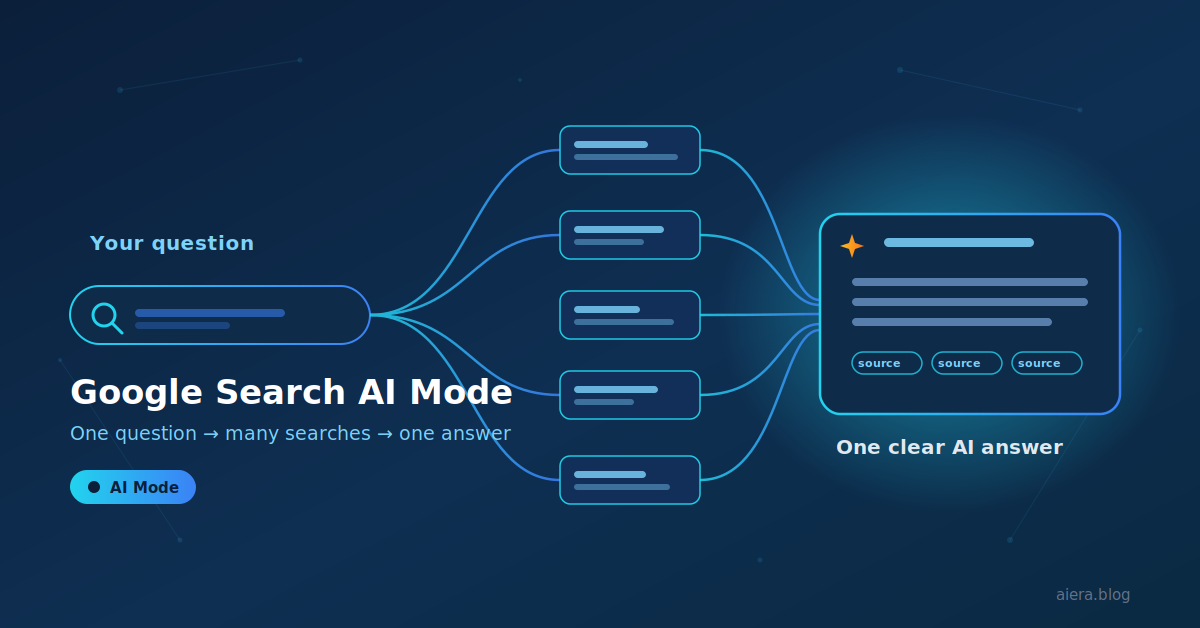
When you ask a question, AI Mode does not run a single search. It uses a method Google calls “query fan-out.” It quietly breaks your question into smaller sub-questions, runs many searches at the same time across different sources, and then pulls everything together into one clear answer. This lets it dig deeper into the web than a normal search and handle questions that once needed several separate searches.
You can also ask in more than one way. Type your question, speak it, or point your camera and snap a photo — AI Mode understands text, voice, and images. Because it is conversational, you can keep going. Ask a follow-up and it remembers the earlier context, so you can refine an answer without starting over.
Answers include links to the web pages behind them, so you can click through and check the source. Google says its responses lean on its long-standing search index to stay grounded in real web content.
The default engine in 2026 is a fast model called Gemini 3.5 Flash. For harder questions, you can switch to a deeper option that Google labels “Thinking with 3 Pro,” which uses Gemini 3 Pro for stronger reasoning. As with any AI tool, the answers can still contain mistakes, so it is wise to verify anything important.
Google Search AI Mode vs AI Overviews vs Gemini App
Many people mix up three different Google products. Here is the simple difference.
| Feature | AI Overviews | AI Mode | Gemini App |
|---|---|---|---|
| Where it appears | Above normal search results | A dedicated tab inside Google Search | A separate standalone app |
| Format | Short AI summary, links still below | Full conversational answer page | Chat-style assistant |
| Powered by | Gemini | Gemini | Gemini |
| Follow-up questions | Limited | Yes | Yes |
| Links to web sources | Yes | Yes | Sometimes |
| Best for | Quick answers while you still see links | Complex, multi-part questions | General AI tasks outside Search |
In plain terms: AI Overviews is a summary at the top of your results, AI Mode turns the whole page into a conversation, and the Gemini app is a separate assistant that is not part of Search.
Key Features of Google Search AI Mode in 2026
AI Mode has grown well beyond simple text answers. A few features stand out:
- Personal Intelligence. You can connect select Google apps so answers fit your own plans and preferences, making responses more tailored to you.
- Generative UI. For some questions, AI Mode builds custom visuals on the fly — interactive tools, simple simulations, and charts — instead of only returning text.
- Nano Banana Pro visuals. This Gemini image model can turn an answer into an infographic or diagram to make complex topics easier to grasp.
- Agentic help. AI Mode is starting to handle tasks, not just answer questions, including early booking features. This agentic direction is the same trend we cover in other stories on aiera.blog, such as how Westpac is putting AI agents to work inside its mortgage business.
If you want to see where tools like this fit among the wider field, our roundup of the best AI tools to use in 2026 is a useful companion read.
How to Use Google Search AI Mode
Getting started takes only a moment:
- Open Google Search and look for the AI Mode tab, or go straight to google.com/ai. On a phone, tap AI Mode in the Google app.
- Type, say, or snap your question. Add all the detail you care about in one go.
- Read the answer, click the source links, and ask follow-ups to go deeper.
- To try the newest experimental features first, opt into the AI Mode experiment in Search Labs.
If you turn on Search History, your AI Mode chats are saved so you can pick up where you left off. To review or clear them, open AI Mode History in the Google app and delete individual items or everything at once. If history is off, you can still use AI Mode fully, but your sessions will not be saved once you close them.
Is Google Search AI Mode Free? Availability in 2026
Yes — the core experience is free, and you do not need a paid plan to use it. Some advanced extras, such as the Gemini 3 Pro “Thinking” option and Nano Banana Pro image generation, may require a Google AI Pro or Ultra subscription or may reach certain users first. Personalized answers are aimed at signed-in users aged 18 and over with the right settings enabled.
Availability still depends on your country, language, and account type, and Google Workspace accounts may have AI Mode limited by an administrator. Because Google is expanding this feature quickly, it is worth checking Google’s own help pages for the latest on your region.
What Google Search AI Mode Means for Users and Websites
For users, the benefit is clear: faster answers and less clicking between tabs. For website owners and publishers, the picture is more mixed. When Google answers directly on the page, fewer people click through to the sites that supplied the information. AI Overviews already appear on a large share of searches — by early 2026, on close to half of all Google queries — and AI Mode goes further by making the generated answer the entire page.
This raises real questions about traffic and about how content creators get credit, which ties into the wider debate over whether the current AI boom is sustainable. The practical takeaway, and something we stress across aiera.blog, is that clear, accurate, well-structured content is more likely to be picked up and cited by AI systems than thin or outdated pages. As search becomes more AI-driven, transparency around sources and solid governance will only grow in importance.
Frequently Asked Questions
Is Google Search AI Mode free? Yes, the core experience is free. Some advanced models or image tools may need a paid Google AI Pro or Ultra plan.
What’s the difference between AI Mode and AI Overviews? AI Overviews is a short AI summary shown above normal results. AI Mode is a full conversational page where the AI answer replaces the list of links.
Which countries have Google Search AI Mode? By 2026 it is live in nearly 200 countries and around 98 languages, with France added in July 2026.
What AI model does Google Search AI Mode use? It runs on Google’s Gemini models, with Gemini 3.5 Flash as the 2026 default and a Gemini 3 Pro “Thinking” option for complex questions.
Can I turn it off or delete my history? You can still use Search without it, and you can clear saved sessions from AI Mode History in the Google app.
Does AI Mode replace normal Google Search? No. Regular search and its links are still there. AI Mode is an added way to search, not a replacement.
Conclusion
Google Search AI Mode is one of the biggest changes to search in years — a move from a list of links to a genuine conversation. It is fast, multimodal, and getting more capable every few months. Whether you are a casual searcher or you run a website, it is worth understanding now rather than later. For more plain-English breakdowns of tools like this, keep following aiera.blog.