Bing AI in 2026: What It Is, How Copilot Search Works, and How to Use It
Bing AI in 2026 is the term many people still use for Microsoft’s AI-powered search experience. In 2026, however, Microsoft’s current product language centers on Copilot and Copilot Search in Bing.
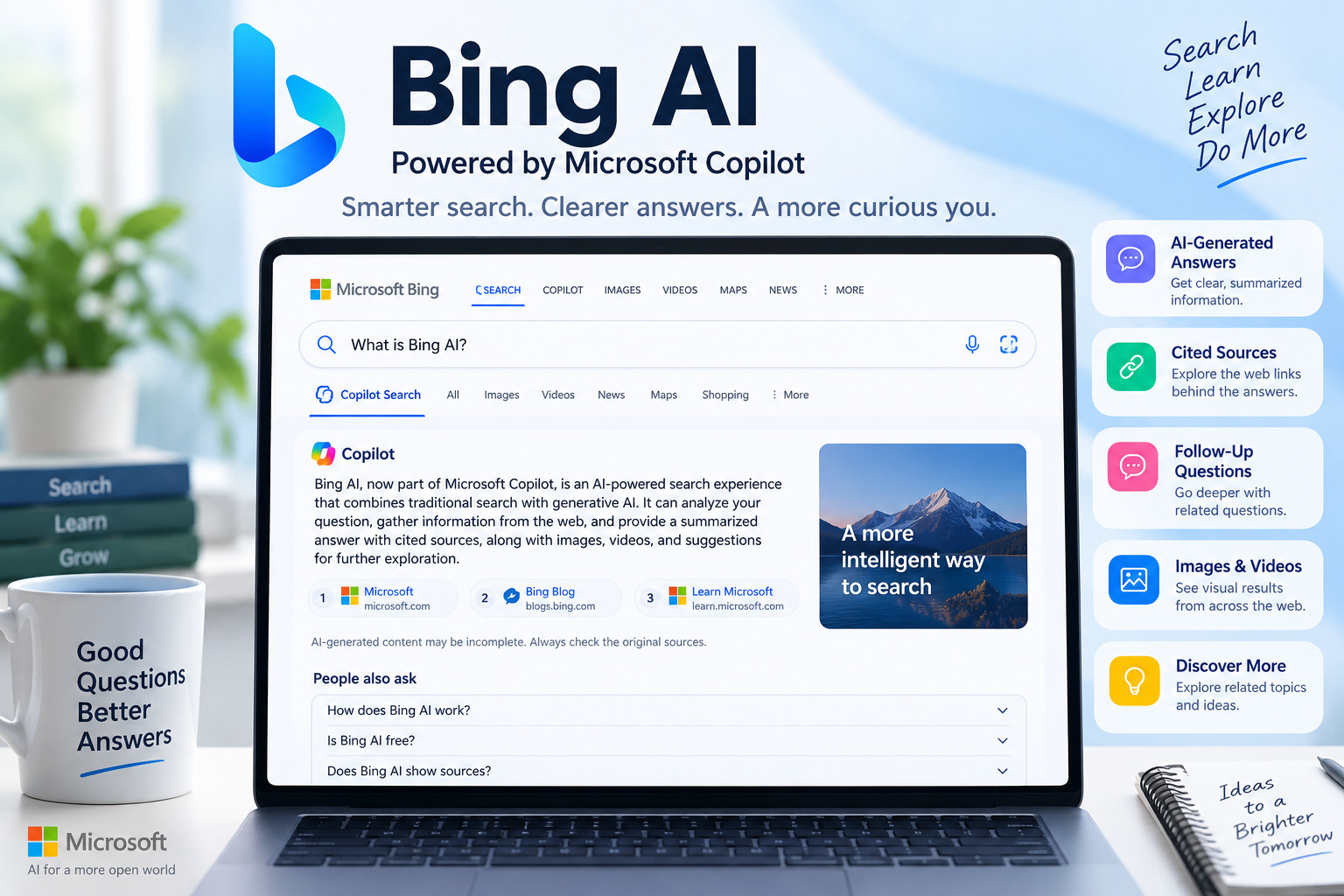
The idea is simple: instead of giving you only a traditional page of blue links, Copilot Search can analyze a question, gather information from the web, generate a summarized response, display sources, and let you continue exploring with follow-up questions.
Microsoft describes Copilot Search in Bing as an AI-powered search and answer engine that combines traditional search with generative AI.
That makes Bing AI useful for people who want a quick explanation or starting point without manually opening ten different search results. It does not, however, mean you should automatically trust every generated sentence. AI search still needs the same thing the ordinary web has always desperately needed: people actually checking the source.
This guide explains what Bing AI means today, how Copilot Search works, what it can do, where its limitations lie, and how to use it more effectively.
What Is Bing AI?
Bing AI generally refers to Microsoft’s AI-enhanced search tools, particularly Copilot Search in Bing.
Microsoft introduced Copilot Search in Bing in April 2025 as an experience combining conventional web search with generative AI. Depending on the query, it can provide a summarized answer, supporting information, source links, images, videos, and suggestions for further exploration.
The terminology can be confusing because Microsoft’s AI products have changed names and evolved considerably.
If you see someone using terms such as:
- Bing AI
- Bing AI Chat
- Bing Chat
- Bing Copilot
- Microsoft Copilot
- Copilot Search
- Copilot Search in Bing
they may be referring to related parts of Microsoft’s AI and search ecosystem rather than identical products.
For someone simply trying to search the public web with AI assistance, Copilot Search in Bing is the particularly relevant experience.
How Does Bing AI Work?
Traditional search engines primarily identify and rank web pages that appear relevant to a query.
AI-powered search adds another layer.
When you ask a question through Copilot Search, the system can use information discovered through search to construct a generated response rather than requiring you to interpret every result yourself.
Microsoft says Copilot Search combines traditional and generative search and provides cited sources alongside AI-generated information.
For example, imagine searching:
What should I consider before buying my first mechanical keyboard?
A traditional search could return articles from manufacturers, review sites, stores, Reddit discussions, and technology publications.
An AI search experience may instead organize the subject into areas such as:
- switch type
- keyboard size
- connectivity
- noise
- keycaps
- compatibility
- budget
You can then inspect its cited sources or ask a more specific follow-up question.
The important distinction is that the AI-generated answer is an interpretation of information, not an original authority on the subject.
Bing AI vs Traditional Bing Search
Both search methods can be useful, but they serve somewhat different purposes.
Traditional Bing Search
Traditional Bing is useful when you want to:
- find a particular website
- locate an official page
- browse several independent sources
- find products or services
- search images and videos
- investigate a topic yourself
- navigate directly to a known resource
You generally receive links and search features that let you decide which sources to investigate.
Copilot Search in Bing
Copilot Search is more useful when you want:
- a summarized response
- context around a complicated question
- information organized into understandable sections
- cited sources supporting an answer
- follow-up questions
- assistance exploring related subjects
Microsoft currently presents traditional Bing Search as suited to finding websites, articles, quick facts, and product information, while Copilot Search is designed for richer context and deeper exploration.
Neither approach needs to replace the other.
For serious research, using both can be smarter than treating AI-generated summaries as a substitute for primary evidence.
Key Bing AI Features in 2026
1. AI-Generated Search Answers
The central feature is the ability to turn search information into an easier-to-read response.
Instead of opening many pages just to understand the basics of a subject, you can use the generated answer as an overview.
This works particularly well for broad questions such as:
- How does solar power work?
- What should I look for in project management software?
- What is the difference between RAM and storage?
- How can a beginner learn video editing?
Once you understand the basic topic, you can move into original sources for greater detail.
2. Cited Sources
One of the most useful parts of Copilot Search is source visibility.
Microsoft says Copilot Search displays sources used to generate an answer and allows users to explore the relevant links.
This matters because generative AI can sometimes produce incomplete, outdated, or incorrect information.
A citation therefore should not be interpreted as decoration.
Open it.
Check whether the original source actually supports the statement being made.
3. Follow-Up Questions
Search is traditionally a series of separate queries.
AI search can make the process more conversational.
You could begin with:
What is cloud computing?
Then continue with:
Explain SaaS, PaaS, and IaaS for a beginner.
And then:
Give me a simple example of each.
That makes the research process feel more connected than repeatedly rebuilding queries from scratch.
4. Suggested Related Topics
Copilot Search can provide suggested questions or topics based on the current search.
These suggestions can help when you know the general subject you want to investigate but do not yet know the right terminology.
The feature can be particularly valuable for beginners researching unfamiliar technical topics.
5. Images and Video Results
Copilot Search is not limited to generated text.
Microsoft’s current Bing interface also integrates relevant media such as images and videos into the search experience.
For visual subjects, that can be much more useful than reading a long paragraph describing something you could understand from an image in five seconds.
How to Use Bing AI Effectively
AI search quality depends partly on how clearly you communicate what you need.
Start With a Specific Question
Compare these two searches:
Broad:
laptops
More useful:
What specifications matter most when choosing a laptop for university students who mainly use Microsoft Office, web browsing, and video calls?
The second query gives the AI information about the intended user and use case.
That helps it organize a more relevant response.
Include Important Constraints
Useful constraints might include:
- budget
- country
- experience level
- time period
- operating system
- business size
- intended purpose
For example:
Compare the main advantages and disadvantages of cloud storage for a small business with fewer than 10 employees.
This is usually more useful than:
Is cloud storage good?
Ask for Comparisons Based on Criteria
Instead of asking:
Which tool is best?
try:
Compare Tool A and Tool B for price, ease of use, integrations, collaboration, and limitations.
Structured criteria make the answer easier to evaluate.
They also reduce the temptation to treat a vague AI recommendation as a final decision.
Use Bing AI as a Research Starting Point
One of the better ways to use AI search is to separate discovery from verification.
A practical workflow looks like this:
- Ask Copilot Search for an overview.
- Identify the important claims.
- Open the cited sources.
- Prefer primary or official sources when available.
- Check dates on information that changes frequently.
- Compare conflicting information.
- Make your conclusion from the evidence rather than the generated summary alone.
This approach is especially important for software features, product availability, prices, laws, medical information, financial decisions, and current events.
Can Bing AI Access Current Web Information?
Microsoft’s AI products can use the Bing search service to retrieve publicly available web information when web search is enabled.
Microsoft explains that Copilot can generate a shorter search query based on a user’s prompt and use Bing results to improve the response with more current information.
This gives web-grounded AI an advantage over systems relying entirely on static training information.
But “connected to search” does not mean “automatically correct.”
A source may itself contain outdated or inaccurate information. The AI may also misunderstand or oversimplify it.
Current information therefore still needs verification when accuracy matters.
Is Bing AI the Same as Microsoft Copilot?
Not exactly.
The names overlap because Microsoft’s AI ecosystem includes several related Copilot experiences.
Copilot Search in Bing focuses on searching and exploring the public web.
Microsoft also has Microsoft Copilot Search, an organizational search system designed for eligible work and school users. It can search across Microsoft 365 and connected third-party organizational data rather than simply functioning as public web search.
Microsoft explicitly distinguishes this enterprise-focused Copilot Search from Copilot Search in Bing.
So when researching instructions or features, check which product the documentation is discussing.
That tiny naming detail can save you from reading three help pages about an entirely different product, which is apparently an unavoidable initiation ceremony for modern software.
What Are the Limitations of Bing AI?
Generative search is useful, but it introduces risks that traditional link-based searching handles differently.
Generated Answers Can Be Wrong
AI-generated text can contain mistakes even when written confidently.
Never assume fluency equals accuracy.
Summaries Can Remove Important Context
An original article might contain:
- qualifications
- exceptions
- methodology
- regional differences
- warnings
- definitions
- limitations
A short AI answer may not preserve all of them.
For important decisions, read the original source.
Sources Can Vary in Quality
A response having citations does not automatically mean every cited source is authoritative.
For important claims, prioritize:
- official documentation
- government websites
- universities
- recognized institutions
- original research
- direct company announcements
Secondary articles can help explain a subject, but they should not replace better primary evidence when primary evidence exists.
Information Can Change
Software and AI products evolve unusually quickly.
Interfaces, features, naming, availability, and account requirements can change.
Always check the publication or update date when researching current product features.
Bing AI and Privacy
Privacy considerations depend on which Microsoft service and account environment you are using.
For Microsoft Copilot and Microsoft Copilot Chat in organizational contexts, Microsoft’s documentation explains that web grounding can involve generating short search queries and sending them to the Bing search service.
Microsoft says these generated web queries do not include the user’s entire prompt unless it is already very short, and enterprise handling includes additional privacy and data-protection conditions.
Consumers and organizations should review the privacy documentation that applies specifically to the Microsoft product and account type they use.
It is also sensible to avoid placing confidential, personal, client, or commercially sensitive information into an AI search tool unless you understand how that particular service handles the data.
When Should You Use Bing AI?
Bing AI can be helpful for:
Learning an unfamiliar subject
Ask for a beginner-friendly overview before moving into technical documentation.
Comparing concepts
It can quickly organize similarities, differences, advantages, and limitations.
Planning research
Use it to identify the terms and questions you should investigate next.
Summarizing broad information
It can reduce the initial effort needed to understand a subject spread across several sources.
Exploring follow-up questions
Conversational search makes it easy to investigate one part of a subject without beginning the entire search process again.
When Should You Rely on the Original Source Instead?
Go directly to authoritative sources when you need:
- exact prices
- product specifications
- legal requirements
- medical advice
- financial information
- academic evidence
- official deadlines
- software documentation
- security instructions
- current company policies
AI can help locate and explain these sources, but it should not become a substitute for them.
A Simple Bing AI Fact-Checking Checklist
Before relying on an AI-generated answer, check:
- Does the answer provide sources?
- Is the source actually relevant to the claim?
- Is there a more authoritative primary source?
- When was the information published or updated?
- Could the information vary by country or account type?
- Does another reliable source agree?
- Is the answer describing confirmed information or making an inference?
- Would an error have meaningful consequences?
The greater the consequences of being wrong, the more verification you should do.
Frequently Asked Questions
Is Bing AI free?
Microsoft provides access to Copilot Search in Bing through Bing, but availability and individual features can change depending on product updates, region, account status, or Microsoft’s service configuration. Check Microsoft’s current Bing pages for the latest access information rather than relying on an old pricing article.
What happened to Bing AI Chat?
Microsoft’s AI branding has evolved considerably. Experiences previously associated with Bing Chat became increasingly integrated into the broader Copilot brand. For current web search, Microsoft now prominently refers to Copilot Search in Bing.
Can Bing AI search the internet?
Copilot experiences that have web search enabled can use information retrieved through the Bing search service. Microsoft says web search helps Copilot incorporate publicly available and timely web information into responses.
Does Bing AI show sources?
Yes. Copilot Search in Bing is designed to display sources used for generated answers, allowing users to inspect where information came from.
Is Bing AI better than normal search?
They solve different problems. Traditional search is useful when you want to browse individual websites or locate something specific. AI-powered search can be useful when you want information summarized and organized before exploring individual sources.
Conclusion
Bing AI has evolved from being a simple label for Microsoft’s early AI-enhanced Bing experiences into a broader search ecosystem centered around Microsoft Copilot.
For public web research, Copilot Search in Bing combines AI-generated answers with traditional search, citations, media, follow-up questions, and related-topic exploration.
Its strongest use is not replacing research but accelerating the beginning of it.
Use Bing AI to understand a subject, identify useful sources, compare information, and discover better questions. Then verify important claims using the original evidence.
That combination gives you the convenience of generative AI without outsourcing your judgment to it.
Sources Consulted
- Microsoft Bing — Copilot Search overview and feature guide.
- Bing Search Blog — “Introducing Copilot Search in Bing,” April 4, 2025.
- Microsoft Copilot Blog — AI search and source improvements in Copilot.
- Microsoft Learn — Data, privacy, and security for web search in Microsoft Copilot.
- Microsoft Support — How web search works in Microsoft Copilot Chat and agents.
- Microsoft Learn — Microsoft Copilot Search documentation and FAQ.
Editorial Transparency Note
Claims requiring final verification before publication: Check Microsoft’s current naming, availability, interface, and access conditions immediately before publishing because AI products change frequently.
Expert review: Not necessary for this general technology explainer, provided the factual Microsoft product information is rechecked before publication.
AI/editorial disclosure: An AI-assistance disclosure may be appropriate if that is part of Aiera.blog’s editorial policy. The article should not claim that Aiera.blog personally tested Bing AI unless genuine testing was performed and documented.
Suggested author byline: AIERA Blog Editorial Team